
Trix Box - VoIPtalk IAX Trunk Setup Guide
The VoIPtalk IAX service requires numbers to be sent with the full country code. For example, if you wish to call our office you would send the number in the following format (e164) to our call server:
442070433490. A rule can be setup to do this in the GUI
-
For Outgoing calls:
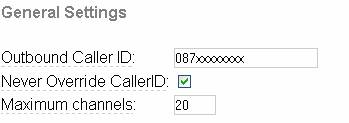
Go to asterisk -> FreePBX, then click Setup, and click Trunks. Click add IAX trunks, and in General Settings enter your PSTN incoming number provisioned by voiptalk.org in the Outbound Caller ID field. - Select the Never Override CallerID check box, and set the Maximum Channels to 20 or any limit you require (There may be a channel limit on your VoIPtalk account depending on your VoIPtalk account tariff)
-
Leave the Outbound Dial Prefix and the Outgoing dialing rule field blank.
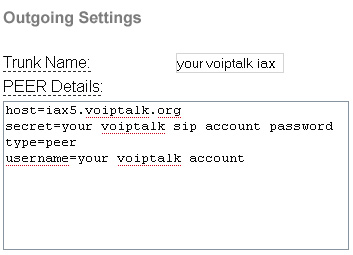
In Outgoing settings, set trunk name to VoIPtalk_SIP, and PEER details ashost=iax5.voiptalk.org secret=your voiptalk iax account password type=peer username=your voiptalk iax account ID
- Leave the Incoming Setting fields blank, and press Submit changes then select the red bar at the top of the screen to reload the Configuration files.
-
Outbound Dialing Route:
Set the IAX2/you_iax_account as a dialing out trunk, click on Outbound Routes and select the default 0 9_outside route. Then select IAX2/your_iax_account, in the Trunk Sequence drop down list 0 and press Add, after that press the Submit button to save the changes.
Select the red bar at the top of the screen to reload the Configuration files.
Note. By default this outbound rule is using prefix 9. You can change this in Dial Patterns as per your requirements.
You should be able to dial out on VoIPtalk trunk. -
Incoming calls
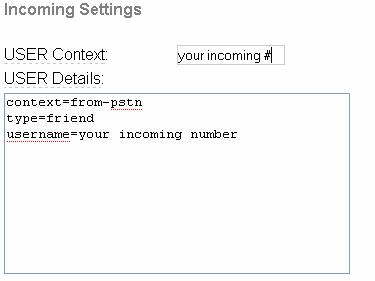
Go to asterisk -> FreePBX click Setup then click Trunks, and select your VoIPtalk trunk you created for out going calls. In Ingoing Settings set the USER context as your voiptalk iax incoming number and set USER Details ascontext=from-pstn type=friend username=your voiptalk iax incoming number
-
Set inbound dialing route:
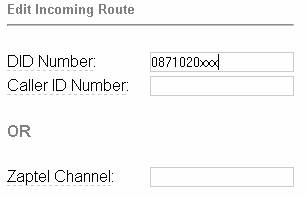
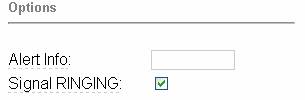
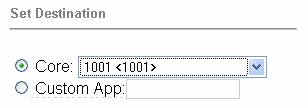
On the left hand side menu click on Inbound Routes and set your PSTN number as DID number, leave the caller id and the Zap channel field blank. This is not required with a VoIPtalk trunk. - Select option Signal RINGING and leave Alert info field as blank. In Set Destination select from the menu of The core extensions of your phone. Press Submit changes and select the red bar at the top of the screen to reload the Configuration files.
-
Set your Dialling plan for your VoIPtalk incoming number:
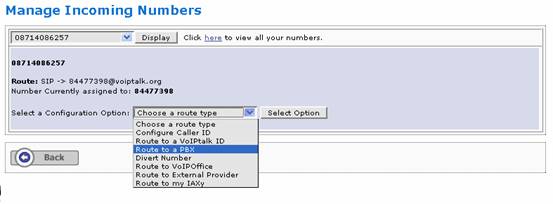
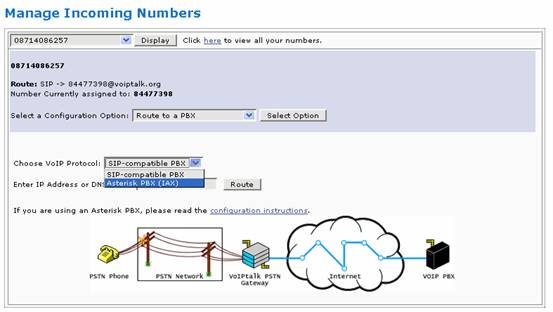
You need to set the routes for your incoming numbers on voiptalk.org to get incoming calls working. To do this go to www.voiptalk.org and click on the my account tab page. Enter your email address and your VoIPtalk user password. (This is not the SIP account password). Then you will see the list of your VoIPtalk IDs and associated incoming numbers, click on the incoming number you want to use with VoIPtalk-SIP trunk on your trix box. This will present you with Manage Incoming Numbers. Select the Configuration Option - Route to a PBX. - Select from Choose VoIP Protocol: Asterisk PBX (IAX)
- Entert the IP address of your trixbox machine and click on route button:
- Dial your incoming number and this should ring the selected extension on Trixbox.